Nail Design App: Art & Inspo
- 0.0
- Rating
- 10.00K
- Installs
- Free
- Price
 Analysis by App-foxy
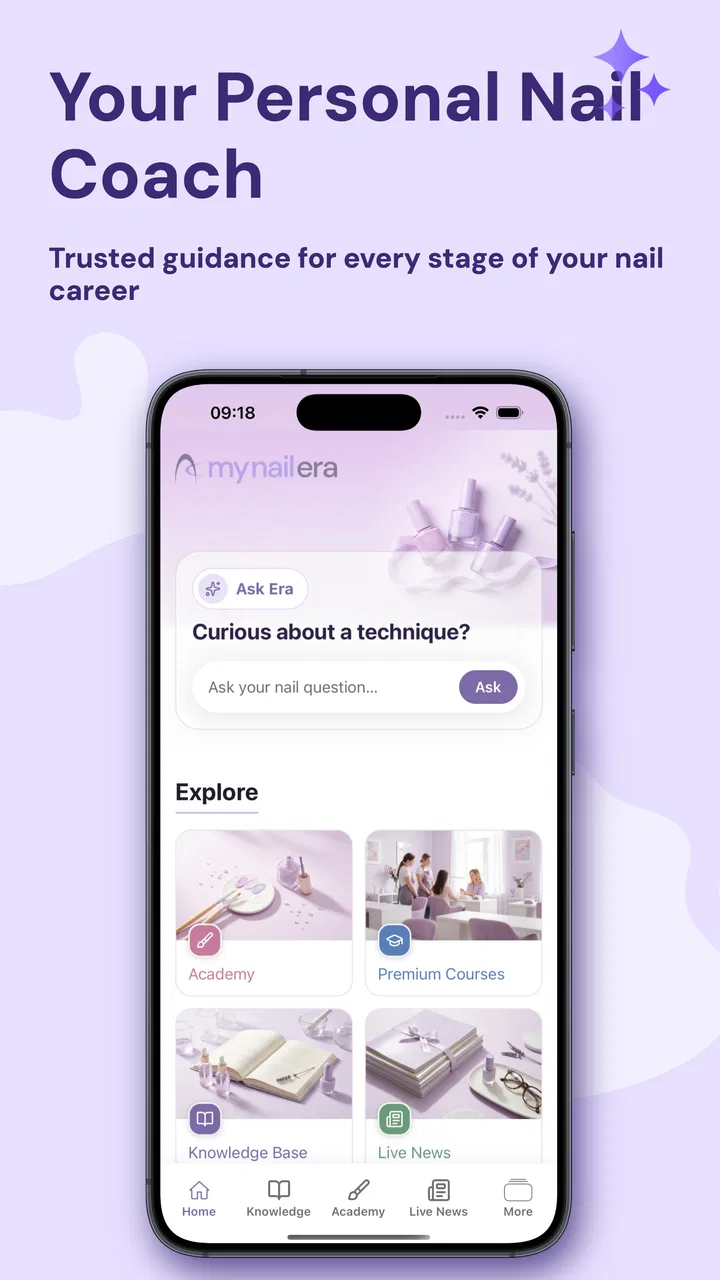
I approached Nail Design App: Art & Inspo as someone who enjoys doing my own nails but often runs out of ideas at the exact moment I sit down with polish and tools. Developed by NailKnowledge, this free beauty app is built around guided nail tutorials and visual inspiration rather than acting as a simple gallery. That distinction matters: the useful part is not only finding a design I like, but having a clearer path from “this looks nice” to “I can actually try this myself.”
My overall impression is that it suits curious beginners and casual nail-art fans best. It gives a phone-friendly way to browse techniques, save mental references, and decide what to attempt before making a mess of a fresh manicure. It is not a replacement for hands-on practice, professional training, or a complete shopping list for every possible design. Still, when I want a quick idea that feels more achievable than a polished social-media photo, it has a practical role.
How the app feels when inspiration depends on a connection
The first thing to understand is that the experience is closely tied to viewing visual material. Tutorials and design references are most useful when they load smoothly, because a nail-art lesson loses much of its value if I cannot see the shape, placement, color contrast, or order of the steps. In everyday use, I would open it while planning a manicure rather than wait until polish is already drying. That gives the app time to become a planning tool instead of something I am forced to consult mid-task.
You May Also Like

 Pandora - Music & Podcasts
Pandora’s Music Is Easy to Start, but Harder to Recover
Pandora’s strength is its low-effort path from a seed to a station. Its weak spot is how much confidence it asks you to place in connection, setup, and quiet recovery.

 AccuWeather: Weather Radar
AccuWeather Review: A Quick, Clear Forecast for Everyday Decisions
For everyday plans, the best forecast is the one you can understand quickly. AccuWeather makes rain timing, radar, and local conditions easy to act on, with a few trade-offs.

 Hill Climb Racing
Why Hill Climb Racing Still Turns Crashes Into One More Run
A tiny car, a bumpy hill and one more upgrade: Hill Climb Racing keeps resurfacing because its simple chaos makes every near-miss feel personal.

 AliExpress - Shopping App
AliExpress Makes Global Shopping Feel Personal, but Shoppers Bear the Risk
AliExpress turns a global marketplace into a pocket-sized discovery engine. Its reach is useful, its shopping loop compelling, and its trade-offs easy to miss.

 Lords Mobile: Kingdom Wars
Lords Mobile Is a Kingdom-Building Routine, Not a Quick Match
A case-by-case verdict on the building, battles, device demands, and social commitments that make Lords Mobile rewarding for some players and exhausting for others.

 PDF Scanner app - TapScanner
TapScanner Makes Paperwork Easier to Capture, Check, and Share
TapScanner makes scanning with a phone feel less like a rescue operation and more like a dependable step in getting work done. Its capture tools are useful, though not flawless.
More From Our News Desk
View All News


This network-sensitive nature changes how I use it. At home on a reliable connection, browsing feels natural: I can move from one idea to another, compare styles, and pause to decide whether a design matches my skill level. On a weaker mobile connection, I would be more deliberate. I would choose a likely design before starting, study the sequence carefully, and avoid assuming that every visual reference will appear instantly when I need it.
The most important practical tip is to treat the app as a preparation space, not as a tool to operate blindly during the manicure. Nail work already demands attention, and repeatedly reaching for a phone while handling wet polish is awkward. I get more value by using the app first to narrow the choice, then keeping the phone nearby only for occasional checks. That workflow also reduces the frustration caused by a slow connection at the worst possible moment.
Compared with ordinary image searches, the app has a more focused purpose. A broad search can produce beautiful but unrealistic results, mixed with advertisements, unrelated images, or designs that do not explain how they were made. Here, the emphasis on tutorials and nail-specific inspiration makes the browsing session more intentional. The trade-off is that a general platform may offer a wider range of creators, unusual styles, and community discussion. I would use a general visual platform for discovery and this app for a more concentrated attempt at learning or recreating a look.
What makes it useful on a small screen
A phone is a surprisingly suitable format for this kind of reference material. I can place it beside my work area, zoom my attention onto one nail at a time, and compare the design with my own hand without opening a laptop. That is especially helpful for short breaks, shopping decisions, or a quick check before choosing between a simple accent nail and a more involved pattern.
There is also a useful psychological advantage. A large collection of online inspiration can make me overambitious, while a focused nail-design app encourages me to think in terms of a manageable project. I can ask myself whether I have the patience, tools, and steady hand for the design before starting. That small pause prevents a common mistake: choosing a look because it photographs well, then discovering that its tiny details are beyond my current technique.
For someone new to nail art, the step-by-step focus is more valuable than a feed that only shows finished results. Finished images are good for taste, but they hide the difficult parts: how much polish is used, where the brush begins, how long a layer needs to settle, and how a mistake is corrected. A tutorial-oriented experience at least points my attention toward process. I still need to develop control through practice, but I am less likely to confuse inspiration with instruction.
For experienced users, the value is different. I would not expect every tutorial to teach an advanced technician something new. Instead, I would use the app to break a routine, find a color arrangement I had not considered, or adapt a familiar technique into a different design. That makes it a useful idea generator, although professionals who need exact technical specifications or salon-focused education may prefer specialized training resources.
Using it during ordinary mobile moments
A realistic use case is a weekend afternoon before meeting friends. I might have a few polishes at home, no fixed design in mind, and only enough time for something neat rather than elaborate. I can browse for a concept, reject anything that depends on tools I do not own, and settle on a design with one decorative feature instead of trying to copy ten different details. The app helps most when I make that decision before opening the bottles.
Another scenario is choosing a manicure for an event. Rather than searching randomly, I can look for a style that fits the occasion, then judge whether the tutorial appears compatible with my available time. This is where I find the difference between “pretty” and “practical” particularly important. A design may look simple in a final image but still require careful layering. I would leave extra time for drying and correction instead of treating the tutorial as a guarantee of instant results.
The app can also help when I am buying supplies. I would use a tutorial to identify the broad type of materials involved, then check the design against what I already have. I would not assume that seeing a tool in a reference means I must purchase an entire collection. Often, a dotting tool can be replaced by a household alternative, or a complex accent can be simplified into a single line. The strongest use of the app is not copying every detail; it is learning which visual elements create the effect.
People who use phones mainly on the move should think about timing. Public transport, crowded cafés, and areas with unstable service are not ideal for discovering a tutorial from scratch. The app may still be convenient in those places, but I would browse when the connection is dependable and avoid building a manicure plan around content I have not fully viewed. That is not a criticism of the design concept; it is simply the reality of a visual app whose usefulness depends on access to its material.
When loading problems affect the manicure
Connectivity problems are more than a minor annoyance when the screen is being used as a guide. If a tutorial pauses while I am trying to remember the next step, I have to choose between waiting, improvising, or touching the phone with polish on my fingers. My preferred recovery method is simple: stop at a safe point, put down the brush, and let the current layer settle while the reference becomes available again. Rushing usually causes more damage than the delay.
I also recommend separating browsing from execution. Before beginning, I would inspect the full sequence, note the order of major steps, and identify any stage that looks easy to forget. This creates a mental outline that remains useful if the connection briefly becomes unreliable. It is a better fallback than repeatedly refreshing the screen while trying to work.
If a design does not load properly, I would switch to a simpler option rather than force the original plan. This is one of the app’s practical limitations: a tutorial can inspire confidence, but the phone cannot compensate for missing tools, limited dexterity, or a reference that is temporarily unavailable. A good recovery plan is to reduce the design to its most recognizable feature. For example, a detailed pattern might become a single accent nail, or a multi-color arrangement might become two shades with one small detail.
That approach also makes the app more forgiving for beginners. A failed attempt does not have to mean removing the entire manicure. I can preserve the base color, cover an uneven section with a contrasting accent, or turn an imperfect line into part of an abstract design. The app provides the starting point, but the best results often come from adapting rather than insisting on an exact copy.
Being sensible with mobile data and attention
Because the app centers on visual tutorials and inspiration, I would use it thoughtfully when relying on mobile data. I would avoid opening it repeatedly just to scroll without a plan, especially if I am in a place where the connection is inconsistent. A short, focused session is more useful: decide what kind of design I want, compare a few realistic options, and stop once I have a workable idea.
This also improves my attention. Endless browsing can make every design seem necessary, and that is a poor way to prepare for a manicure. I get better results by setting a limit for myself: one main design, one simpler backup, and a quick check of what materials are available. The app becomes a decision aid instead of another source of indecision.
I would be particularly careful before starting a tutorial that contains many small steps. If I cannot confidently follow the sequence, I would first study it in a stable setting. That small investment saves both data and polish. It also helps me identify whether the design depends on precision that I am not ready to reproduce. Honest self-assessment is important here; an app can show a technique clearly, but it cannot make an unsteady hand suddenly precise.
The free entry price makes experimentation easy, while optional purchases range from $2.49 to $49.99 per item. I would approach those purchases slowly and only after deciding that the app fits my routine. A free app is attractive for occasional inspiration, but the higher end of the purchase range makes it sensible to consider how often I will actually use deeper or additional material. I would not pay simply because a design looks impressive; I would pay only if the extra guidance solves a real problem in my own practice.
That pricing structure also affects who should skip it. If I only want a few random pictures for a single event, a general image search may be enough. If I need structured education, detailed product recommendations, or professional-level technique correction, I would look for a more specialized resource. Nail Design App: Art & Inspo makes more sense for someone who wants a focused, repeatable source of ideas and tutorials without committing to a paid service immediately.
Who will enjoy it, and who may outgrow it
I see the strongest fit among beginners, self-taught users, and people who enjoy changing their manicure without following the same routine every time. The Everyone content rating also makes it approachable for a broad audience. Parents and younger users can explore designs together, although any nail work should still be supervised appropriately and handled with ordinary care around tools and cosmetic products.
It is also a good match for someone who feels overwhelmed by social feeds. The dedicated beauty focus reduces the effort of filtering out unrelated content. I can open it with a clear intention—simple lines, seasonal colors, a beginner-friendly accent—and spend less time sorting through material that has nothing to do with nails.
On the other hand, I would not choose it as my only resource if I already have advanced technical training. Experienced nail artists may want precise explanations of product chemistry, shaping, sanitation, or correction techniques rather than primarily visual guidance. Likewise, someone who dislikes learning from a phone may find a printed guide or a long-form video course more comfortable, especially for designs that require both hands and continuous attention.
The app’s current version is 1.4.10, and its relatively modest audience of over ten thousand installs gives it the feel of a focused tool rather than an enormous mainstream platform. I would not interpret that as a quality judgment. It simply suggests that users should approach it for its specific nail-art purpose, not expect the breadth or social energy of a giant beauty network.
My connectivity verdict after using it as a planning companion
Connectivity shapes the experience more than it might appear from the short description. When access is smooth, the app is convenient and motivating: I can move from an idea to a sequence of actions without leaving the nail-focused environment. When access is poor, the same visual dependence becomes the main friction. The solution is not complicated, but it requires a sensible habit—browse first, understand the plan, and keep a simpler alternative ready.
I like Nail Design App: Art & Inspo because it encourages me to think about process rather than only admire finished nails. Its best contribution is helping turn vague inspiration into a project I can judge realistically. I can decide whether I have the time, tools, and patience before committing, and I can simplify a design without losing its character.
For a free beauty app from NailKnowledge, it offers a useful starting point for personal nail-art practice. The optional purchases mean I would evaluate my usage before spending, and the connection-sensitive format means I would not rely on it as an emergency instruction manual once polish is wet. With those limits in mind, Nail Design App: Art & Inspo is worth trying for anyone who wants guided ideas on a phone and prefers a focused nail-design coach to an unfiltered stream of images.
FAQs for Nail Design App: Art & Inspo
01What is Nail Design App: Art & Inspo used for?
Nail Design App: Art & Inspo is primarily an inspiration and idea-discovery tool for anyone interested in manicures, nail art, and salon-style designs. It can help you browse different colors, patterns, shapes, and decorative styles before choosing your next look. It is especially useful when you want visual references to show a nail technician or ideas to recreate at home.
02Can beginners use Nail Design App: Art & Inspo to create nail designs?
Yes, the app can be useful for beginners because it provides visual examples that make it easier to understand current nail-art trends and combinations. However, it should not be considered a complete professional tutorial unless a specific design includes detailed instructions. Some looks may require practice, specialized tools, gel products, extensions, or professional application, so users should choose designs according to their experience.
03Does Nail Design App: Art & Inspo include tutorials or only inspiration images?
The main purpose of Nail Design App: Art & Inspo is to provide nail inspiration, so the amount of step-by-step guidance may vary between designs. Some content may offer useful visual direction, while other posts are better treated as references rather than full tutorials. Before downloading, users who need detailed instructions should check the app’s current listing and content description to confirm what learning features are available.
04Is Nail Design App: Art & Inspo free to download and use?
The app may be available to download at no initial cost, but free access does not always mean that every feature or piece of content is unrestricted. Depending on the current version, users may encounter advertising, optional purchases, subscriptions, or premium design collections. It is advisable to review the app-store pricing section and subscription terms before signing up, especially if payment details are requested.
05Is Nail Design App: Art & Inspo suitable for professional nail technicians?
It can be a convenient source of creative references for professional nail technicians, particularly when discussing preferences with clients or looking for seasonal and trendy concepts. However, professionals should evaluate the quality, originality, and technical accuracy of each design before using it as a working reference. The app may support inspiration and consultation, but it should not replace professional product knowledge, hygiene standards, or advanced nail-art training.
Pros
- Large variety of nail art ideas for different styles and occasions.
- Helpful inspiration for beginners and experienced nail artists alike.
- Easy to browse designs and save favorites for later reference.
- Useful color and pattern combinations spark creative ideas.
- Convenient source of manicure inspiration without needing salon visits.
Cons
- Some designs may be difficult to recreate without professional tools.
- The app may require internet access for loading images and content.
- Ad interruptions can make browsing less convenient for some users.
- Image quality and design details may vary between different posts.
- Limited customization options may make it hard to plan a specific manicure.

Nail Design App: Art & Inspo
Gallery